Field Notes · from Field Trip

Start Here with Gemini

Where Gemini lives in Google Workspace, what it's good at, what to keep away from it, and how to keep district data safe.

District Office
Gemini

Copy this prompt

I work in a school district office. My job is [your role]. List five tasks from a typical week where you could save me time, and for each one, tell me what I would need to check before using your output.

Start with the right account

Always sign in with your school Google account, never a personal Gmail. When your district uses Google Workspace for Education, Google says Gemini chats and files from school accounts aren't used to train its AI models and aren't reviewed by people. A personal account doesn't come with those protections.

If you don't see Gemini anywhere, your district's Google admin may not have turned it on yet. Ask your tech department before you go looking for workarounds.
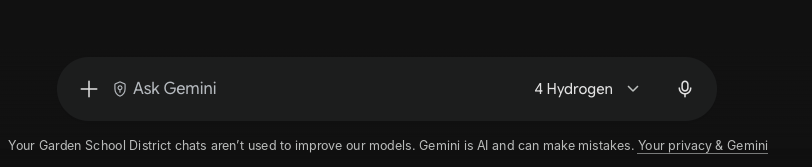
How to tell your data is protected

  1. Before you type: click your profile picture in the top right of gemini.google.com and make sure your school email is the active account. If you're also signed into a personal Gmail in the same browser, this is where mix-ups happen.
  2. After your first prompt: look just below the prompt box. You should see a line that names your district and says your chats aren't used to improve Google's models.
Gemini prompt box with the notice: Your Garden School District chats aren't used to improve our models.
What the notice looks like for a school account. Your district's name appears where this example says "Garden School District."

If that line doesn't name your district, stop and switch to your school account before you go any further.

Where Gemini lives

  • The Gemini app (gemini.google.com): a general assistant for drafting, summarizing, and brainstorming. Canvas lets you build documents and slide decks inside the chat.
  • Inside Gmail, Docs, Sheets, and Slides: the Gemini side panel works with the file you have open. It's best for "summarize this thread," "draft a reply," or "build slides from this outline."
  • Gemini Notebook (formerly NotebookLM): upload a set of documents and ask questions that are answered only from those documents. Best for policies, handbooks, and reports.

Try the prompt above in the Gemini app to find your own best starting points.

Good jobs for Gemini

  • First drafts: letters, announcements, emails, agendas.
  • Rewriting: shorter, simpler, more formal, or for a different audience.
  • Summarizing long documents, email threads, or meeting notes.
  • Turning notes into slides, tables, or checklists.
  • Finding answers in a long policy or handbook (Gemini Notebook).

Keep these away from Gemini

  • Decisions about a student or a staff member. Discipline, placement, eligibility, evaluations, and anything similar need a person's judgment.
  • Anything you can't check. Gemini can state wrong facts confidently. If you can't verify the output, don't use it.
  • Final versions of legal, HR, or compliance documents without review by the person responsible.

Keep data safe

  • Follow your district's AI policy first. The school account protections are a floor, not permission. Your district decides what's allowed.
  • Practice with sample data. Try a new prompt on made-up records before using it on real work.
  • Watch what you upload. Files in Gemini Notebook and Gemini chats follow the same rules as anything you'd paste.

Watch out for

Gemini is a fast first draft, not a final answer. Read everything before it goes out, check every date, name, and number, and you'll keep the time savings without the surprises.

Before you use student data

Before you put student data into Gemini, confirm your district uses Google Workspace for Education and that you're signed in with your school account, not a personal Gmail. Not sure? Check with your tech department first.

Want a year of this?

Field Trip is a year of hands-on AI training for district and school office teams: one course a month, instructor feedback on every activity, and a cohort of peers.

See Field Trip