
Version 2.8 — November 2026
SRSS results now use the risk categories from the Ci3T team who created the screener, and the portal's sidebar is rebuilt to work the same way on every page.
SRSS Risk Categories: Low, Moderate, High
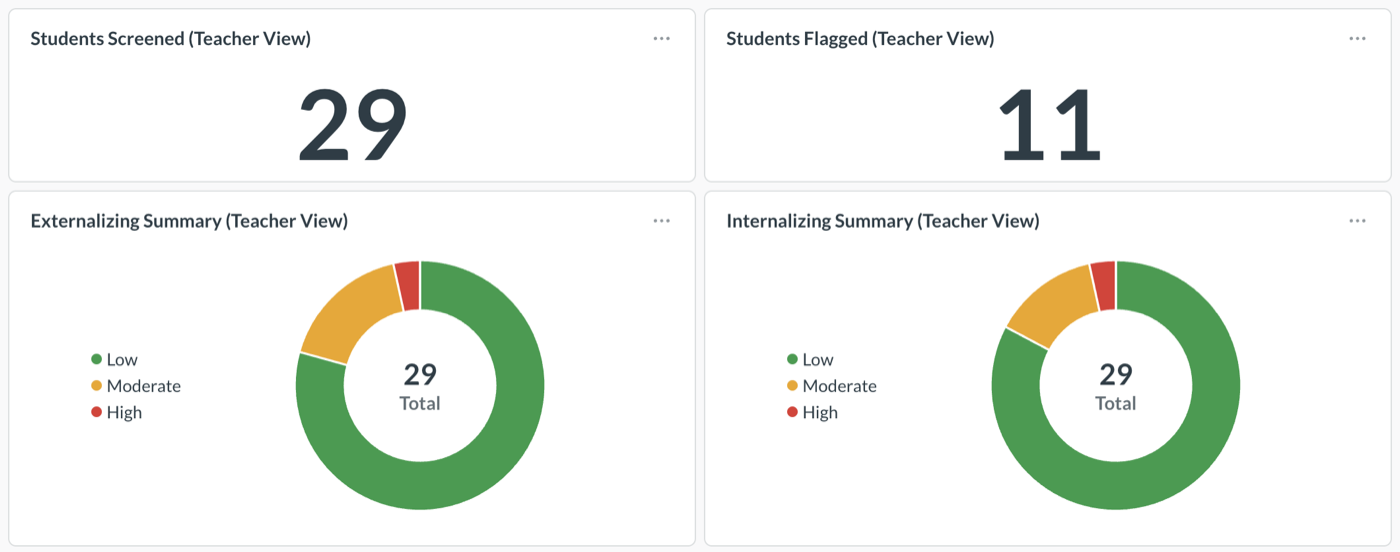
Your SRSS dashboards now label each student's externalizing and internalizing results Low, Moderate, or High. These replace No Indication of Concern, Slightly Elevated, and Elevated, and match the terms the Ci3T team uses in its own training and materials, so what you see in the portal lines up with what your coordinators learned.
Only the names changed. The cut scores are the same, so a student who was Elevated last term is High now, and comparisons across terms still hold. If you've saved filters or exports that use the old names, look for the new ones instead.
Learn how: Score Interpretation Guide
A Refreshed Sidebar
The left sidebar is rebuilt, and it's now the same on every page of the portal. Your dashboards, their order, and what your role can see haven't changed. District and school dashboards sit under District dashboards and School dashboards, the page you're on scrolls into view when it opens, and you can open categories, schools, and the Manage menu with the keyboard. Log out is always in your account menu at the bottom of the sidebar.
Learn how: Navigating the Portal
Improvements & Fixes
- Faster pages. The portal now compresses pages before sending them, so dashboards and lists load faster, especially on slower school networks.
- Clear out an unfinished upload. In the Assessment Manager, an upload you started but never finished stays at Pending. You can now remove it with Discard. Nothing was imported from it, so no data is affected.
- Upload history shows finished uploads. Assessment cards now show your last completed upload, not one left at Pending.
- Clearer upload screens. The upload check names the assessment you're uploading, and the instructions match the buttons on the page.
See How Standard Education Can Help Keep a Pulse on Your District
We're dedicated to student success. Our real-time dashboards provide the insights to transform educational strategies, ensuring every student has the opportunity to thrive.
Subscribe to the Report Card
Join us for the latest updates on our platform and customer success stories—right in your inbox.